
'%3e%3cg%20clip-path='url(%23b)'%3e%3cpath%20fill='%23fff'%20d='M.5%200h24v18H.5z'/%3e%3cpath%20fill='%23F7FCFF'%20fill-rule='evenodd'%20d='M.5%200h24v18H.5z'%20clip-rule='evenodd'/%3e%3cpath%20fill='%23E31D1C'%20fill-rule='evenodd'%20d='M.5%2011v1.5h24V11zM.5%2013.75v1.5h24v-1.5zM.5%205.5V7h24V5.5zM.5%2016.5V18h24v-1.5zM.5%208.25v1.5h24v-1.5zM.5%200v1.5h24V0zM.5%202.75v1.5h24v-1.5z'%20clip-rule='evenodd'/%3e%3cpath%20fill='%232E42A5'%20d='M.5%200h15v9.75H.5z'/%3e%3cpath%20fill='%23F7FCFF'%20fill-rule='evenodd'%20d='m4.791%202.204-.544.382.184-.68-.484-.43h.632L4.79.922l.248.554h.538l-.423.43.164.68zm-3%200-.544.382.184-.68-.484-.43h.632L1.79.922l.248.554h.538l-.423.43.164.68zm5.456.382.544-.382.527.382-.164-.68.423-.43H8.04L7.791.922l-.212.554h-.632l.484.43zm3.544-.382-.544.382.184-.68-.484-.43h.632l.212-.554.248.554h.539l-.424.43.164.68zM1.247%205.586l.544-.382.527.382-.164-.68.423-.43H2.04l-.248-.554-.212.554H.947l.484.43zm3.544-.382-.544.382.184-.68-.484-.43h.632l.212-.554.248.554h.538l-.423.43.164.68zm2.456.382.544-.382.527.382-.164-.68.423-.43H8.04l-.248-.554-.212.554h-.632l.484.43zm3.544-.382-.544.382.184-.68-.484-.43h.632l.212-.554.248.554h.539l-.424.43.164.68zM1.247%208.586l.544-.382.527.382-.164-.68.423-.43H2.04l-.248-.554-.212.554H.947l.484.43zm3.544-.382-.544.382.184-.68-.484-.43h.632l.212-.554.248.554h.538l-.423.43.164.68zm2.456.382.544-.382.527.382-.164-.68.423-.43H8.04l-.248-.554-.212.554h-.632l.484.43zm3.544-.382-.544.382.184-.68-.484-.43h.632l.212-.554.248.554h.539l-.424.43.164.68zm2.456-5.618.544-.382.527.382-.164-.68.424-.43h-.539l-.248-.554-.212.554h-.632l.484.43zm.544%202.618-.544.382.184-.68-.484-.43h.632l.212-.554.248.554h.539l-.424.43.164.68zm-.544%203.382.544-.382.527.382-.164-.68.424-.43h-.539l-.248-.554-.212.554h-.632l.484.43zM3.291%203.704l-.544.382.184-.68-.484-.43h.632l.212-.554.248.554h.538l-.423.43.164.68zm2.456.382.544-.382.527.382-.164-.68.423-.43H6.54l-.248-.554-.212.554h-.632l.484.43zm3.544-.382-.544.382.184-.68-.484-.43h.632l.212-.554.248.554h.539l-.424.43.164.68zM2.747%207.086l.544-.382.527.382-.164-.68.423-.43H3.54l-.248-.554-.212.554h-.632l.484.43zm3.544-.382-.544.382.184-.68-.484-.43h.632l.212-.554.248.554h.538l-.423.43.164.68zm2.456.382.544-.382.527.382-.164-.68.424-.43h-.539l-.248-.554-.212.554h-.632l.484.43zm3.544-3.382-.544.382.184-.68-.484-.43h.632l.212-.554.248.554h.539l-.424.43.164.68zm-.544%203.382.544-.382.527.382-.164-.68.424-.43h-.539l-.248-.554-.212.554h-.632l.484.43z'%20clip-rule='evenodd'/%3e%3c/g%3e%3c/g%3e%3cdefs%3e%3cclipPath%20id='a'%3e%3crect%20width='24'%20height='18'%20x='.5'%20fill='%23fff'%20rx='3'/%3e%3c/clipPath%3e%3cclipPath%20id='b'%3e%3cpath%20fill='%23fff'%20d='M.5%200h24v18H.5z'/%3e%3c/clipPath%3e%3c/defs%3e%3c/svg%3e)


Item Bags
Creator: SlayerDharok
Updated:05/05/2025 19:32:03
288KB

Trusted by 200,000,000+ Users
Pre-required Mods
will be automatically installed when you use Item Bags
About this Mod
Adds several new "Bag" items that can hold other items inside of them, while still only taking up a single inventory slot. Unlike chests, the bags will hold items while they are in your inventory, effectively increasing inventory size and
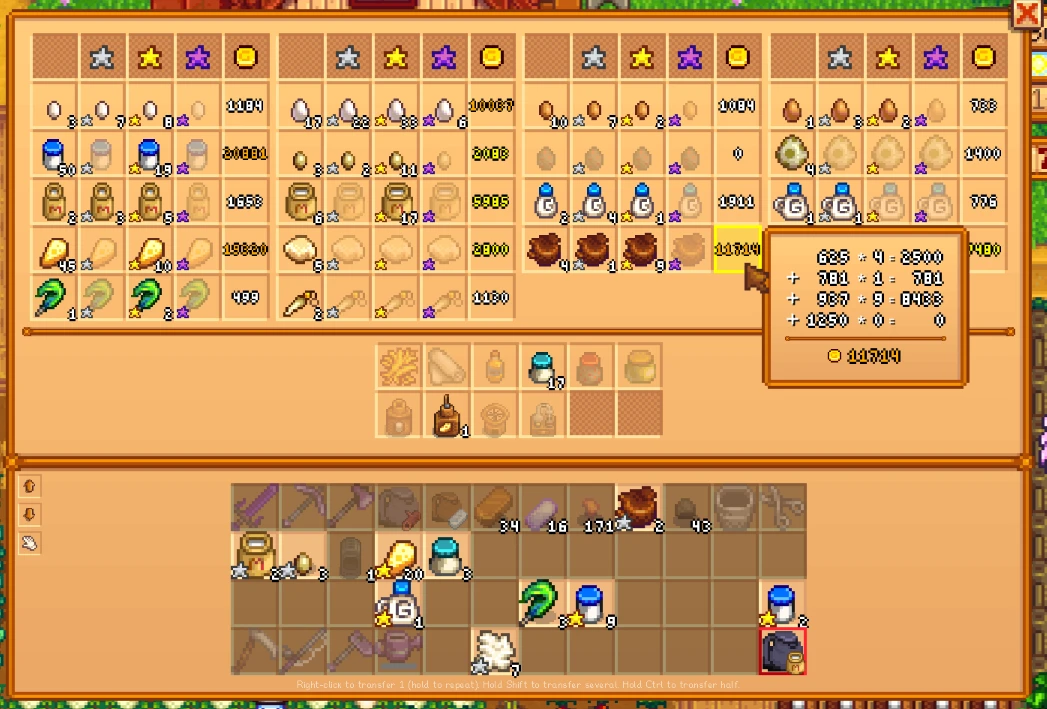
This mod adds 4 different kinds of bags, most of which come in 5 different sizes (Small, Medium, Large, Giant, and Massive). Bigger sizes are capable of storing higher quantities of the same item, and usually are capable of storing a wider array of items than their smaller versions. Each bag has its own fully custom interface, capable of grouping items by their quality, calculating and displaying summed values of similar items, or even holding more than the usual 999 limit of an item in a single slot!
Types of bags:
How to obtain:
Autofill:
To open a bag, just right-click it from your toolbar, inventory, or inside of a chest. (Gamepad controls are also supported)
The biggest and most expensive bags are even capable of storing more than 999 of each item.
Want to easily keep track of items you need for Community Center bundles? Then try buying the Bundle Bag from the Travelling Merchant! It will dynamically keep track of how many of each item you still need for incomplete bundles, and has its own custom menu:
Rucksacks can store almost any stackable item, rather than being restricted to a predefined list of items. Sold by Pierre.
Rucksacks can be sorted by Time, Name, Id, Category, Quantity, Single item value, Stack item value, or Item Similarity (Same Id but different Quality and/or Price) by clicking the sort button in the top-right. The autofill feature on Rucksacks is a little bit different. Items will only be autofilled into a Rucksack if there is already an existing stack of that item in the Rucksack. You can set Rucksacks to either low-priority or high-priority autofilling. (Low-priority means the mod will first search for a non-rucksack bag to autofill, and only fill the rucksack as a last resort if nothing else was found.)
FAQs:
This mod adds 4 different kinds of bags, most of which come in 5 different sizes (Small, Medium, Large, Giant, and Massive). Bigger sizes are capable of storing higher quantities of the same item, and usually are capable of storing a wider array of items than their smaller versions. Each bag has its own fully custom interface, capable of grouping items by their quality, calculating and displaying summed values of similar items, or even holding more than the usual 999 limit of an item in a single slot!
Types of bags:
Spoiler:
Show
- The Bundle Bag
- Holds items required by incomplete Community Center Bundles
- Backpacks
- Holds almost any stackable item you want, like having a nested inventory within your inventory
- Only holds standard Objects, things like fish, vegetables, fruits, craftables, resources, seeds, artifacts, gems, foods, animal products etc.
- Does NOT hold things like equippables (rings, hats, clothing), weapons, tools
- Standard Bags
- Each one stores specific items
- Comes in several different sub-types
- Gem Bag (holds gems, such as ruby, emerald, topaz...)
- Smithing Bag (holds coal, ores, bars, geodes)
- Mineral Bag (holds minerals that you receive from geodes, like calcite, sandstone, mudstone...)
- Mining Bag (holds stone, coal, ores, gems, geodes)
- Resource Bag (holds resources like wood, fiber, stone, ores, clay...)
- Construction Bag (holds woods, stone, fences, gates, floors, paths)
- Tree Bag (holds tree seeds (regular and fruit), tappers, tapper products like pine tar, wood, sap, tree fertilizer, tree fruits)
- Animal Product Bag (holds animal products, like eggs, milks, cheese, duck feathers, mayonnaise...)
- Recycling Bag (holds trash that you'd find from fishing, like newspaper, driftwood, broken glasses...)
- Loot Bag (holds common monster drops, like bug meat, slime, light/dark essence, bat wings...)
- Foraging Bag (holds foraged items like horseradish, salmonberry, hazelnut, various mushrooms, beach items like sea urchins and much more...)
- Artifact Bag (holds artifacts that you can donate to Gunther)
- Seed Bag (holds seeds)
- Fishing Bags (holds all kinds of fish, including crab pot fish)
- Farmer's Bags (holds farming essentials like fertilizers, scarecrows, and sprinklers)
- Food Bags (holds cooked dishes, common cooking ingredients, alcohols, medicines, and crafted edibles)
- Crop Bags (holds farmable fruits, vegetables, and flowers)
- Omni Bags
- Holds other bags inside of it (up to 1 of each other bag)
How to obtain:
Spoiler:
Show
Bags can be purchased from various shops. Some of the larger sizes are only available from 1 specific seller. To collect them all, try visiting: Pierre, Clint, Robin, Willy, Marnie, Krobus, Dwarf, Marlon, Sandy, and the Travelling Merchant.
Bags can also be received as rare drops from killing any monster. (Usually a 1/100-1/300 chance depending on how strong the monster was and where you killed it) The biggest sizes of bags are either extremely rare, or cannot be obtained from monsters at all. (These settings can be changed in the mod's config.json file)
Bags can also be received as rare drops from killing any monster. (Usually a 1/100-1/300 chance depending on how strong the monster was and where you killed it) The biggest sizes of bags are either extremely rare, or cannot be obtained from monsters at all. (These settings can be changed in the mod's config.json file)
Autofill:
Spoiler:
Show
Autofill is a feature that can be toggled on by clicking the hand icon near the bottom-left corner of a bag's menu. When toggled on, it will make items that you pick up automatically get placed inside of the bag.
In this example, the 3 stone I pick up are automatically transferred to my mining bag. (Stone quantity inside bag goes from 45->48)
Note: You can also toggle autofill on specific items. If autofill is turned on for your bag, then hover over an item slot and click the small hand icon in the top-left corner of the slot to toggle autofill of that specific item. This can be especially useful if you have multiple bags that can store the same item, but you want that item to be autofilled into a particular bag.
Autofill only happens when you pick up items that you don't already have an existing stack of in your inventory. EX: You have 998 wood in your inventory. You pick up 1 wood. It doesn't autofill, stacks with the 998. Then you pick up another wood. Rather than making a new stack with qty=1 in your inventory, that wood can be autofilled into a bag that you're holding. Autofill isn't only for items added to your inventory. It can also happen when you deposit items into a chest, if the chest already is holding a bag that has autofill toggled on.
In this example, the 3 stone I pick up are automatically transferred to my mining bag. (Stone quantity inside bag goes from 45->48)
Note: You can also toggle autofill on specific items. If autofill is turned on for your bag, then hover over an item slot and click the small hand icon in the top-left corner of the slot to toggle autofill of that specific item. This can be especially useful if you have multiple bags that can store the same item, but you want that item to be autofilled into a particular bag.
Autofill only happens when you pick up items that you don't already have an existing stack of in your inventory. EX: You have 998 wood in your inventory. You pick up 1 wood. It doesn't autofill, stacks with the 998. Then you pick up another wood. Rather than making a new stack with qty=1 in your inventory, that wood can be autofilled into a bag that you're holding. Autofill isn't only for items added to your inventory. It can also happen when you deposit items into a chest, if the chest already is holding a bag that has autofill toggled on.
To open a bag, just right-click it from your toolbar, inventory, or inside of a chest. (Gamepad controls are also supported)
The biggest and most expensive bags are even capable of storing more than 999 of each item.
Want to easily keep track of items you need for Community Center bundles? Then try buying the Bundle Bag from the Travelling Merchant! It will dynamically keep track of how many of each item you still need for incomplete bundles, and has its own custom menu:
Rucksacks can store almost any stackable item, rather than being restricted to a predefined list of items. Sold by Pierre.
Rucksacks can be sorted by Time, Name, Id, Category, Quantity, Single item value, Stack item value, or Item Similarity (Same Id but different Quality and/or Price) by clicking the sort button in the top-right. The autofill feature on Rucksacks is a little bit different. Items will only be autofilled into a Rucksack if there is already an existing stack of that item in the Rucksack. You can set Rucksacks to either low-priority or high-priority autofilling. (Low-priority means the mod will first search for a non-rucksack bag to autofill, and only fill the rucksack as a last resort if nothing else was found.)
FAQs:
Spoiler:
Console commands:
Does this work on Android?
Does this support Netplay/Multiplayer?
Where are this mod's config files?
The bags are too expensive! Can you lower the price?
{
"Size": "Massive",
"PriceModifier": 1.0,
"CapacityModifier": 1.0,
"BasePrice": 1000000,
"BaseCapacity": 9999,
"Slots": 72,
"MenuColumns": 12,
"MenuSlotSize": 64
}
with something like this:
{
"Size": "Massive",
"PriceModifier": 1.0,
"CapacityModifier": 1.0,
"BasePrice": 1000000,
"BaseCapacity": 9999,
"Slots": 288,
"MenuColumns": 24,
"MenuSlotSize": 48
}
How do I uninstall?
Source code?
Can I store modded items in the bags?
Show
Console commands:
- This mod adds several SMAPI console commands that can be used to spawn bags in your inventory if you don't want to buy them or just want to try one out for testing. You can always type "help
" into the SMAPI console for more details. - "player_addrucksack
" - adds a Rucksack to your inventory. Example: "player_addrucksack Giant" - "player_addomnibag
" - adds an Omni Bag to your inventory. Example: "player_addomnibag Medium" - "player_addbundlebag
" - adds a Bundle Bag to your inventory. Size must either be Large or Massive. Example: "player_addbundlebag Large" - "player_additembag
" - adds a standard bag to your inventory. Type is the name of the standard bag sub-type, such as "Gem Bag" or "Foraging Bag". Example: "player_additembag Massive Fish Bag"
Does this work on Android?
- It used to. Not sure if it does anymore as I've not been maintaining the Android version in ages.
Does this support Netplay/Multiplayer?
- Probably not. Many issues have been reported regarding bag data not remaining properly synced in multiplayer. If using in multiplayer, do so at your own risk and ensure that all players have the latest ItemBags version installed.
Where are this mod's config files?
- There are 2 config files:
- config.json - located in the mod's install directory.
\Mods\ItemBags\config.json - bagconfig.json - prior to v3.0.5, this was located in SMAPI's mod global data folders, typically
\Roaming\StardewValley\.smapi\mod-data\SlayerDharok.Item_Bags\bagconfig.json. Now it's located in mod's install directory. Editing this file is NOT recommended, only for advanced users - More details about these files can be found in the readme on the "Docs" tab.
The bags are too expensive! Can you lower the price?
- You can configure the prices (and several other values) to suit your needs by editing the config.json file in your mod installation directory. Just open this file in any text editor and change the values to your liking. For example, if you wanted Massive Rucksacks to store literally hundreds of items, you could replace this:
{
"Size": "Massive",
"PriceModifier": 1.0,
"CapacityModifier": 1.0,
"BasePrice": 1000000,
"BaseCapacity": 9999,
"Slots": 72,
"MenuColumns": 12,
"MenuSlotSize": 64
}
with something like this:
{
"Size": "Massive",
"PriceModifier": 1.0,
"CapacityModifier": 1.0,
"BasePrice": 1000000,
"BaseCapacity": 9999,
"Slots": 288,
"MenuColumns": 24,
"MenuSlotSize": 48
}
How do I uninstall?
- You can uninstall just as you would any other mod - just delete the mod folder. BUT first you should load your save, remove all items from your bags, delete/trash your bags, re-save your game, and then delete the mod folder. Otherwise you'll lose any items you had stored in your bags and could also be left with erroneous items in your save file!
Source code?
Can I store modded items in the bags?
Spoiler:
modded_items.json information:
Show
- Yes, there are 2 ways to use modded items inside of bags:
- The first method is to put special .json files that define the modded bag's settings, in this folder:
\assets\Modded Bags . (Creating Modded Bags) (User-Created Modded Bags) - The second method is to edit the modded_items.json file in the mod's installation directory. This file lets you specify what modded items you want to be able to store inside of pre-existing standard bags.
modded_items.json information:
Spoiler:
Show
[This file supports regular objects added to the game by JsonAssets or ContentPatcher. You can define some basic metadata about the item(s) you want to store in this file.
Here is brief example:
{
"CreatedByVersion": "1.3.4",
"Mods": [
{
"ModUniqueId": "ppja.artisanvalleyPFM", // The "UniqueID" of the manifest.json that the items belong to
"Bags": [ // An array of all bags that will be modified to support modded items for the "ppja.artisanvalleyPFM" mod
{
"Name": "Farmers Bag", // The name of the bag that you want to be able to store modded items in. Does not include the bag's Size.
"Items": [
{
"Name": "Drying Rack", // The name of the modded item
"IsBigCraftable": true, // true if the modded item is an object that can be placed on a tile (such as a furnace, seed maker, keg etc)
"HasQualities": false, // true if the item is available in multiple qualities (Regular/Silver/Gold/Iridium)
"RequiredSize": "Large" // the minimum size of the bag that is needed to hold this modded item. Value must either be "Small", "Medium", "Large", "Giant", or "Massive"
}
]
}
]
}
]
}
The above sample would do the following:
If "ppja.artisanvalleyPFM" mod is installed, then you will be able to store "Drying Rack" items inside of "Farmers Bag" whose size is >= "Large" (Large, Giant, and Massive)
So you are specifying which modded items you want to store and some metadata about them (in this case, "Drying Rack", with IsBigCraftable=true, HasQualities=false). Then you are specifying what sizes of what bags you want to be able to put this item in (in this case, "Farmers Bag" of size>=Large). Then you are also specifying which mod the items belong to (in this case, "ppja.artisanvalleyPFM") so that they will only be imported if the corresponding other mod is installed.
Here is brief example:
{
"CreatedByVersion": "1.3.4",
"Mods": [
{
"ModUniqueId": "ppja.artisanvalleyPFM", // The "UniqueID" of the manifest.json that the items belong to
"Bags": [ // An array of all bags that will be modified to support modded items for the "ppja.artisanvalleyPFM" mod
{
"Name": "Farmers Bag", // The name of the bag that you want to be able to store modded items in. Does not include the bag's Size.
"Items": [
{
"Name": "Drying Rack", // The name of the modded item
"IsBigCraftable": true, // true if the modded item is an object that can be placed on a tile (such as a furnace, seed maker, keg etc)
"HasQualities": false, // true if the item is available in multiple qualities (Regular/Silver/Gold/Iridium)
"RequiredSize": "Large" // the minimum size of the bag that is needed to hold this modded item. Value must either be "Small", "Medium", "Large", "Giant", or "Massive"
}
]
}
]
}
]
}
The above sample would do the following:
If "ppja.artisanvalleyPFM" mod is installed, then you will be able to store "Drying Rack" items inside of "Farmers Bag" whose size is >= "Large" (Large, Giant, and Massive)
So you are specifying which modded items you want to store and some metadata about them (in this case, "Drying Rack", with IsBigCraftable=true, HasQualities=false). Then you are specifying what sizes of what bags you want to be able to put this item in (in this case, "Farmers Bag" of size>=Large). Then you are also specifying which mod the items belong to (in this case, "ppja.artisanvalleyPFM") so that they will only be imported if the corresponding other mod is installed.
Top Mods for Stardew Valley
Explore the best mods for Stardew Valley that bring new features, upgraded visuals, and exciting ways to transform your gameplay experience.
Content Patcher
Pathoschild28/07/2025 06:03:57
Loads content packs that change the game's data, images, and maps without replacing XNB files.
Content Patcher
Pathoschild26/10/2025 17:17:30
Loads content packs that change the game's data, images, and maps without replacing XNB files.
SMAPI - Stardew Modding API
Pathoschild15/07/2025 09:52:47
The mod loader for Stardew Valley.
NPC Map Locations
Bouhm26/05/2025 10:22:12
See NPC and players on the map, with an optional minimap.
CJB Cheats Menu
Pathoschild28/07/2025 06:19:19
A simple in-game cheats menu with lots of cheats.
SpaceCore
spacechase028/05/2025 10:06:38
A framework mod used by some of my other mods.
Stardew Valley Expanded
FlashShifter01/07/2025 07:17:39
mod描述游戏中玩家扮演继承了爷爷农场的“Stardew valley”主角开阔和经营整座小牧场。 你继承了爷爷在星露谷的农场,但是你手头上只有最基础的农具和少许的金钱,你得靠此开始你的新生活。你能把这片杂草丛生的田地变成一个繁荣的家园吗?这很不容易,自从JOJA公司来到了小镇,以前的生活都变了。社区中心,这个曾经是小镇最活跃的地方,如今却是破烂不堪。但山谷里似乎充满了机会,只要你肯努力,就有可能把星露谷变得更繁荣。 开始游戏后,玩家可以通过捏人的方式创建自己所喜爱的角色。人物共有24种肤色,32
Farm Type Manager (FTM)
EscaMMC22/07/2025 13:55:17
Farm Type Manager (FTM) is a framework that lets other mods spawn objects and monsters anywhere in the game, with various controls and customization options.
Unlock the full potential of Stardew Valley with XMODhub—explore these top mods today!
Trusted by 200,000,000+ Users
Need help with download or installation? Join our Discord community for support.

'%3e%3crect%20x='0.5'%20width='24'%20height='18'%20rx='3'%20fill='white'/%3e%3cg%20id='flag'%3e%3cg%20id='contents'%3e%3cpath%20id='bottom'%20fill-rule='evenodd'%20clip-rule='evenodd'%20d='M0.5%2012H24.5V18H0.5V12Z'%20fill='%23FFD018'/%3e%3cpath%20id='middle'%20fill-rule='evenodd'%20clip-rule='evenodd'%20d='M0.5%206H24.5V12H0.5V6Z'%20fill='%23E31D1C'/%3e%3cpath%20id='middle_2'%20fill-rule='evenodd'%20clip-rule='evenodd'%20d='M0.5%200H24.5V6H0.5V0Z'%20fill='%23272727'/%3e%3c/g%3e%3c/g%3e%3c/g%3e%3c/g%3e%3cdefs%3e%3cclipPath%20id='clip0_992_70053'%3e%3crect%20x='0.5'%20width='24'%20height='18'%20rx='3'%20fill='white'/%3e%3c/clipPath%3e%3c/defs%3e%3c/svg%3e)
'%3e%3cg%20clip-path='url(%23b)'%3e%3cpath%20fill='%23fff'%20d='M.5%200h24v18H.5z'/%3e%3cpath%20fill='%23F7FCFF'%20fill-rule='evenodd'%20d='M.5%200v18h24V0z'%20clip-rule='evenodd'/%3e%3cmask%20id='c'%20width='25'%20height='18'%20x='0'%20y='0'%20maskUnits='userSpaceOnUse'%20style='mask-type:luminance'%3e%3cpath%20fill='%23fff'%20fill-rule='evenodd'%20d='M.5%200v18h24V0z'%20clip-rule='evenodd'/%3e%3c/mask%3e%3cg%20mask='url(%23c)'%3e%3cpath%20fill='%233D58DB'%20fill-rule='evenodd'%20d='M12.5%2013.666c2.402%200%204.349-2.068%204.349-4.62%200-2.55-1.947-4.618-4.35-4.618-2.401%200-4.349%202.068-4.349%204.619s1.948%204.618%204.35%204.618'%20clip-rule='evenodd'/%3e%3cmask%20id='d'%20width='9'%20height='10'%20x='8'%20y='4'%20maskUnits='userSpaceOnUse'%20style='mask-type:luminance'%3e%3cpath%20fill='%23fff'%20fill-rule='evenodd'%20d='M12.5%2013.666c2.402%200%204.349-2.068%204.349-4.62%200-2.55-1.947-4.618-4.35-4.618-2.401%200-4.349%202.068-4.349%204.619s1.948%204.618%204.35%204.618'%20clip-rule='evenodd'/%3e%3c/mask%3e%3cg%20mask='url(%23d)'%3e%3cpath%20fill='%23E31D1C'%20fill-rule='evenodd'%20d='M17.001%209.4s-.244-2.178-2.052-2.296-2.295%201.597-2.4%202.052c-.104.454-.368%201.666-2.271%201.666S8.202%207.74%208.202%207.74V4.104h8.8z'%20clip-rule='evenodd'/%3e%3c/g%3e%3cpath%20fill='%23272727'%20fill-rule='evenodd'%20d='m5.974%201.54.686.62-3.18%203.715-.686-.621zm1.132%201.005.686.62-3.066%203.66-.687-.62zm1.812%201.637-.686-.62-3.074%203.687.686.62zM19.522%201.28l-.686.618%201.19%201.397.687-.619zm2.117%202.57-.687.618%201.19%201.397.687-.619zm-5.068.06.686-.618%201.19%201.397-.686.618zm2.802%201.952-.686.618%201.19%201.397.687-.618zm-1.627-2.988.687-.618%203.314%204.035-.687.619zM20.04%2010.683l-.692-.62-1.2%201.402.692.62zm-2.018%202.469-.692-.621-1.201%201.402.692.621zm3.512-1.127.692.621-1.2%201.403-.693-.621zm-1.228%203.147-.692-.62-1.2%201.402.692.62zm-1.832-1.688.692.621-1.253%201.498-.692-.62zm2.748-1.874-.692-.621-1.253%201.498.692.62zM5.305%2011.168l.686-.62%203.064%203.511-.687.62zm.714%203.07.687-.619L8%2015.041l-.687.619zm-2.287-1.72-.686.62%203.079%203.557.686-.619zm.488-.404.687-.619%201.122%201.316-.687.619z'%20clip-rule='evenodd'/%3e%3c/g%3e%3c/g%3e%3c/g%3e%3cdefs%3e%3cclipPath%20id='a'%3e%3crect%20width='24'%20height='18'%20x='.5'%20fill='%23fff'%20rx='3'/%3e%3c/clipPath%3e%3cclipPath%20id='b'%3e%3cpath%20fill='%23fff'%20d='M.5%200h24v18H.5z'/%3e%3c/clipPath%3e%3c/defs%3e%3c/svg%3e)

'%3e%3cmask%20id='b'%20width='25'%20height='18'%20x='0'%20y='0'%20maskUnits='userSpaceOnUse'%20style='mask-type:luminance'%3e%3cpath%20fill='%23fff'%20d='M.5%200h24v18H.5z'/%3e%3c/mask%3e%3cg%20mask='url(%23b)'%3e%3cpath%20fill='%23fff'%20fill-rule='evenodd'%20d='M-1%200h27v18H-1z'%20clip-rule='evenodd'/%3e%3cpath%20fill='%23BC002D'%20d='M12.502%2014.596a5.595%205.595%200%201%200%200-11.19%205.595%205.595%200%200%200%200%2011.19'/%3e%3c/g%3e%3cg%20clip-path='url(%23c)'%3e%3cpath%20fill='%23fff'%20d='M.5-.5h24v18H.5z'/%3e%3cpath%20fill='%23F7FCFF'%20fill-rule='evenodd'%20d='M.5-1.1v18h24v-18z'%20clip-rule='evenodd'/%3e%3cmask%20id='d'%20width='25'%20height='19'%20x='0'%20y='-2'%20maskUnits='userSpaceOnUse'%20style='mask-type:luminance'%3e%3cpath%20fill='%23fff'%20fill-rule='evenodd'%20d='M.5-1.1v18h24v-18z'%20clip-rule='evenodd'/%3e%3c/mask%3e%3cg%20mask='url(%23d)'%3e%3cpath%20fill='%23E31D1C'%20fill-rule='evenodd'%20d='M.5-1.1v9h24v-9z'%20clip-rule='evenodd'/%3e%3c/g%3e%3c/g%3e%3c/g%3e%3cdefs%3e%3cclipPath%20id='a'%3e%3crect%20width='24'%20height='18'%20x='.5'%20fill='%23fff'%20rx='3'/%3e%3c/clipPath%3e%3cclipPath%20id='c'%3e%3cpath%20fill='%23fff'%20d='M.5-.5h24v18H.5z'/%3e%3c/clipPath%3e%3c/defs%3e%3c/svg%3e)
'%3e%3cmask%20id='b'%20width='25'%20height='18'%20x='0'%20y='0'%20maskUnits='userSpaceOnUse'%20style='mask-type:luminance'%3e%3cpath%20fill='%23fff'%20d='M.5%200h24v18H.5z'/%3e%3c/mask%3e%3cg%20mask='url(%23b)'%3e%3cpath%20fill='%23fff'%20fill-rule='evenodd'%20d='M-1%200h27v18H-1z'%20clip-rule='evenodd'/%3e%3cpath%20fill='%23BC002D'%20d='M12.502%2014.596a5.595%205.595%200%201%200%200-11.19%205.595%205.595%200%200%200%200%2011.19'/%3e%3c/g%3e%3cg%20clip-path='url(%23c)'%3e%3cpath%20fill='%23fff'%20d='M-.834-.5h26.667v20H-.834z'/%3e%3cpath%20fill='%23F7FCFF'%20fill-rule='evenodd'%20d='M-1.167-1.167H25.5v20H-1.167z'%20clip-rule='evenodd'/%3e%3cpath%20fill='%23E31D1C'%20fill-rule='evenodd'%20d='M-1.167-1.167v20H25.5v-20z'%20clip-rule='evenodd'/%3e%3cmask%20id='d'%20width='28'%20height='21'%20x='-2'%20y='-2'%20maskUnits='userSpaceOnUse'%20style='mask-type:luminance'%3e%3cpath%20fill='%23fff'%20fill-rule='evenodd'%20d='M-1.167-1.167v20H25.5v-20z'%20clip-rule='evenodd'/%3e%3c/mask%3e%3cg%20mask='url(%23d)'%3e%3cpath%20fill='%23FFD221'%20fill-rule='evenodd'%20d='m12.217%2012.15-4.292%202.729%201.44-4.778L6.303%206.98l4.22-.092%201.868-4.717%201.702%204.779%204.211.074-3.164%203.178%201.477%204.545z'%20clip-rule='evenodd'/%3e%3c/g%3e%3c/g%3e%3c/g%3e%3cdefs%3e%3cclipPath%20id='a'%3e%3crect%20width='24'%20height='18'%20x='.5'%20fill='%23fff'%20rx='3'/%3e%3c/clipPath%3e%3cclipPath%20id='c'%3e%3cpath%20fill='%23fff'%20d='M-.834-.5h26.667v20H-.834z'/%3e%3c/clipPath%3e%3c/defs%3e%3c/svg%3e)

'%3e%3cmask%20id='b'%20width='25'%20height='18'%20x='0'%20y='0'%20maskUnits='userSpaceOnUse'%20style='mask-type:luminance'%3e%3cpath%20fill='%23fff'%20d='M.5%200h24v18H.5z'/%3e%3c/mask%3e%3cg%20mask='url(%23b)'%3e%3cpath%20fill='%23fff'%20fill-rule='evenodd'%20d='M-1%200h27v18H-1z'%20clip-rule='evenodd'/%3e%3cpath%20fill='%23BC002D'%20d='M12.502%2014.596a5.595%205.595%200%201%200%200-11.19%205.595%205.595%200%200%200%200%2011.19'/%3e%3c/g%3e%3cg%20clip-path='url(%23c)'%3e%3cpath%20fill='%23fff'%20d='M-.834-.5h26.667v20H-.834z'/%3e%3cpath%20fill='%23093'%20fill-rule='evenodd'%20d='M-1.167-1.167v20H25.5v-20z'%20clip-rule='evenodd'/%3e%3cmask%20id='d'%20width='28'%20height='21'%20x='-2'%20y='-2'%20maskUnits='userSpaceOnUse'%20style='mask-type:luminance'%3e%3cpath%20fill='%23fff'%20fill-rule='evenodd'%20d='M-1.167-1.167v20H25.5v-20z'%20clip-rule='evenodd'/%3e%3c/mask%3e%3cg%20mask='url(%23d)'%3e%3cg%20fill-rule='evenodd'%20clip-rule='evenodd'%20filter='url(%23e)'%3e%3cpath%20fill='%23FFD221'%20d='m12.105%201.92%2010.168%207.086-10.306%206.636-9.96-6.773z'/%3e%3cpath%20fill='url(%23f)'%20d='m12.105%201.92%2010.168%207.086-10.306%206.636-9.96-6.773z'/%3e%3c/g%3e%3cpath%20fill='%232E42A5'%20fill-rule='evenodd'%20d='M12.167%2013.166a4.167%204.167%200%201%200%200-8.333%204.167%204.167%200%200%200%200%208.333'%20clip-rule='evenodd'/%3e%3cmask%20id='g'%20width='9'%20height='10'%20x='8'%20y='4'%20maskUnits='userSpaceOnUse'%20style='mask-type:luminance'%3e%3cpath%20fill='%23fff'%20fill-rule='evenodd'%20d='M12.167%2013.166a4.167%204.167%200%201%200%200-8.333%204.167%204.167%200%200%200%200%208.333'%20clip-rule='evenodd'/%3e%3c/mask%3e%3cg%20fill='%23F7FCFF'%20mask='url(%23g)'%3e%3cpath%20fill-rule='evenodd'%20d='m10.817%2010.975-.187.098.036-.207-.15-.147.208-.03.093-.189.093.189.208.03-.15.147.035.207zM12.483%2010.975l-.186.098.035-.207-.15-.147.208-.03.093-.189.093.189.208.03-.15.147.035.207zM12.483%2011.975l-.186.098.035-.207-.15-.147.208-.03.093-.189.093.189.208.03-.15.147.035.207zM11.65%208.475l-.187.098.036-.207-.15-.147.208-.03L11.65%208l.093.189.208.03-.15.147.035.207zM11.65%2010.141l-.187.098.036-.207-.15-.147.208-.03.093-.189.093.189.208.03-.15.147.035.207zM10.483%209.308l-.186.098.035-.207-.15-.147.208-.03.093-.189.093.189.208.03-.15.147.035.207zM9.317%209.975l-.186.098.035-.207-.15-.147.208-.03.093-.189.093.189.208.03-.15.147.035.207zM13.15%207.141l-.187.098.036-.207-.15-.147.208-.03.093-.189.093.189.208.03-.15.147.035.207z'%20clip-rule='evenodd'/%3e%3cpath%20d='m7.104%207.998.125-1.662c3.998.301%207.154%201.616%209.427%203.955l-1.195%201.161c-1.97-2.026-4.743-3.182-8.357-3.454'/%3e%3c/g%3e%3c/g%3e%3c/g%3e%3c/g%3e%3cdefs%3e%3cclipPath%20id='a'%3e%3crect%20width='24'%20height='18'%20x='.5'%20fill='%23fff'%20rx='3'/%3e%3c/clipPath%3e%3cclipPath%20id='c'%3e%3cpath%20fill='%23fff'%20d='M-.834-.5h26.667v20H-.834z'/%3e%3c/clipPath%3e%3clinearGradient%20id='f'%20x1='25.5'%20x2='25.5'%20y1='18.833'%20y2='-1.167'%20gradientUnits='userSpaceOnUse'%3e%3cstop%20stop-color='%23FFC600'/%3e%3cstop%20offset='1'%20stop-color='%23FFDE42'/%3e%3c/linearGradient%3e%3cfilter%20id='e'%20width='20.267'%20height='13.723'%20x='2.007'%20y='1.92'%20color-interpolation-filters='sRGB'%20filterUnits='userSpaceOnUse'%3e%3cfeFlood%20flood-opacity='0'%20result='BackgroundImageFix'/%3e%3cfeColorMatrix%20in='SourceAlpha'%20result='hardAlpha'%20values='0%200%200%200%200%200%200%200%200%200%200%200%200%200%200%200%200%200%20127%200'/%3e%3cfeOffset/%3e%3cfeColorMatrix%20values='0%200%200%200%200.0313726%200%200%200%200%200.368627%200%200%200%200%200%200%200%200%200.28%200'/%3e%3cfeBlend%20in2='BackgroundImageFix'%20result='effect1_dropShadow_414_2340'/%3e%3cfeBlend%20in='SourceGraphic'%20in2='effect1_dropShadow_414_2340'%20result='shape'/%3e%3c/filter%3e%3c/defs%3e%3c/svg%3e)
'%3e%3cmask%20id='b'%20width='25'%20height='18'%20x='0'%20y='0'%20maskUnits='userSpaceOnUse'%20style='mask-type:luminance'%3e%3cpath%20fill='%23fff'%20d='M.5%200h24v18H.5z'/%3e%3c/mask%3e%3cg%20mask='url(%23b)'%3e%3cpath%20fill='%23fff'%20fill-rule='evenodd'%20d='M-1%200h27v18H-1z'%20clip-rule='evenodd'/%3e%3cpath%20fill='%23BC002D'%20d='M12.502%2014.596a5.595%205.595%200%201%200%200-11.19%205.595%205.595%200%200%200%200%2011.19'/%3e%3c/g%3e%3c/g%3e%3cdefs%3e%3cclipPath%20id='a'%3e%3crect%20width='24'%20height='18'%20x='.5'%20fill='%23fff'%20rx='3'/%3e%3c/clipPath%3e%3c/defs%3e%3c/svg%3e)


'%3e%3cpath%20d='M0%200.0529785H8.00035V18.9467H0V0.0529785Z'%20fill='%23008D46'/%3e%3cpath%20d='M8.00049%200.0529785H16.0008V18.9467H8.00049V0.0529785Z'%20fill='white'/%3e%3cpath%20d='M16.0005%200.0529785H24.0019V18.9467H16.0005V0.0529785Z'%20fill='%23D2232C'/%3e%3c/g%3e%3cdefs%3e%3cclipPath%20id='clip0_1698_2581'%3e%3crect%20width='24'%20height='19'%20rx='3'%20fill='white'/%3e%3c/clipPath%3e%3c/defs%3e%3c/svg%3e)
Gaming solutions
Resources
Partners
Follow us on

'/%3e%3cpath%20id='f'%20d='M21.2137%2020.2816L21.8356%2016.3301H17.9452V13.767C17.9452%2012.6857%2018.4877%2011.6311%2020.2302%2011.6311H22V8.26699C22%208.26699%2020.3945%208%2018.8603%208C15.6548%208%2013.5617%209.89294%2013.5617%2013.3184V16.3301H10V20.2816H13.5617V29.8345C14.2767%2029.944%2015.0082%2030%2015.7534%2030C16.4986%2030%2017.2302%2029.944%2017.9452%2029.8345V20.2816H21.2137Z'%20fill='white'/%3e%3c/g%3e%3cdefs%3e%3clinearGradient%20id='paint0_linear_1709_56585'%20x1='16'%20y1='2'%20x2='16'%20y2='29.917'%20gradientUnits='userSpaceOnUse'%3e%3cstop%20stop-color='%2318ACFE'/%3e%3cstop%20offset='1'%20stop-color='%230163E0'/%3e%3c/linearGradient%3e%3c/defs%3e%3c/svg%3e)


Contact Support:
support@xmodhub.com
Xmod_Lily
Business Inquiries:
dc@xmodhub.com or lynn@business.xmodhub.com
catherine_79237
Larvas Limited
Room 1201, 12/F Tai Sang Bank Building 130-132 Des Voeux Road Central HK
We use cookies to make interactions with our websites and services easy and meaningful. For more information about the cookies we use or to find out how you can disable cookies, click here